
Scaling Agile With Jira Align: Connecting Strategy to Delivery
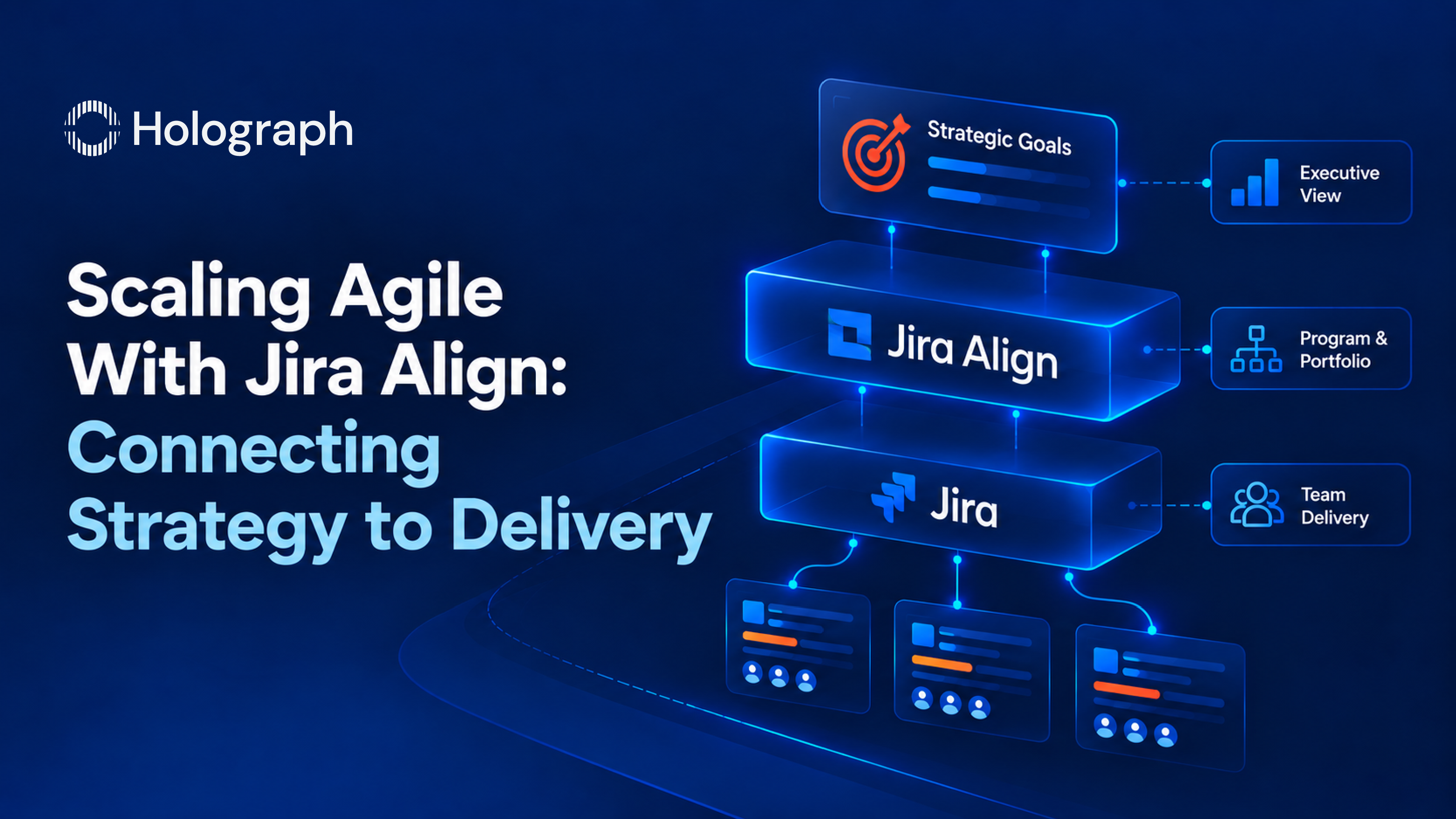
Most enterprises run agile at the team level and lose it above that line. The teams work in sprints and ship in Jira, but leadership cannot see how the work in those sprints connects to the strategy that funded it. So the connection gets rebuilt by hand, in spreadsheets and status decks, every reporting cycle. Strategy gets lost in translation on the way down to the teams, and progress gets lost in translation on the way back up. The gap between what teams are building and what leadership expects is the single most expensive problem in scaled agile, and it is not a tooling gap. The teams already have the tool. What is missing is the layer that connects their work to the strategy above it.
That layer is what Jira Align provides, and putting it in place is Performance work: getting more from the Atlassian investment an organization already runs, by making team-level delivery visible and steerable at the portfolio and enterprise level. This is the guide to what Jira Align does, when it fits, and how an implementation actually goes.
The strategy-to-execution gap
The gap shows up the same way in most large organizations. Executives set a strategy and fund a set of initiatives. Those initiatives are handed down, broken into work, and distributed across many teams, each planning and delivering in its own Jira project. From the team's seat the work is clear. From the top the picture is not: there is no single view of how the funded initiatives are progressing, where they are blocked, or whether the capacity is aimed at the priorities that matter.
To close that gap without the right layer, people build it manually. Program managers pull data out of Jira, reconcile it across teams, and assemble a status view in a spreadsheet or a slide deck, which is stale the moment it is finished. The reverse path is just as lossy: strategy described in a leadership deck arrives at the teams as a list of tickets with the reasoning stripped out. The cost is not only the hours spent reconciling. It is decisions made on old data, capacity spent on work that no longer matters, and a persistent gap between the plan and the delivery that neither side can fully see. It also compounds as the organization grows. Every new team and program widens the gap and adds another source that has to be reconciled by hand, so the manual approach gets more expensive at exactly the point where a clear view matters most.
What Jira Align does
Jira Align is Atlassian's enterprise agile-planning product. It sits above the team-level tools and connects strategy to execution across portfolios, programs, and teams, so the work the teams do every day rolls up into a live view of the initiatives leadership funded. Teams keep working in Jira; Jira Align coordinates and plans at the program, portfolio, and enterprise layers on top of it.
Four things follow from that connection. Leadership gets a single view of progress, risks, and dependencies across every portfolio and team, updated from real delivery data rather than assembled by hand. Teams get a clear line of sight from their work up to the strategy it serves, so the reasoning survives the trip down. Dependencies and blockers across programs become visible early, where they can be coordinated, rather than surfacing late as a missed release. And capacity and investment can be mapped to the highest-priority work, and adjusted when conditions change, because the plan and the delivery are the same data rather than two versions of it.
A concrete example. When an executive asks why a funded initiative is behind, the answer normally takes a program manager days to assemble across many teams. With the strategy and delivery layers connected, that answer is a view rather than a project: the initiative, the programs under it, the teams doing the work, and the specific dependency or capacity constraint holding it up, all current. The question that used to trigger a fire drill becomes a query.
The point is not more reporting. It is that the reporting stops being manual, and the plan becomes something leadership can steer in real time instead of reconstructing every quarter.
Where it fits, and where it does not
Jira Align is built for scale, and that is also the boundary of when to use it. It earns its place when many teams and programs need coordinating, when governance and executive planning matter, and when the organization has enough agile maturity above the team level for the tool to reflect something real. For coordinating a handful of teams inside Jira, Advanced Roadmaps is the simpler fit, and moving to Jira Align before the organization is ready produces an expensive tool that models a process the teams are not yet running. The choice between the two comes down to scale, governance need, and readiness, which we cover in detail in our comparison of Jira Align and Advanced Roadmaps.
Jira Align also does not impose a single way of working. It supports scaled frameworks such as SAFe, a homegrown model, or a hybrid of agile and waterfall, and is configured to match how the organization actually operates rather than forcing a textbook process onto it. That flexibility matters because most large organizations do not run one clean framework. They run a mix that has grown over time, and a planning layer that supports only a single textbook model forces a choice between changing the tool and changing how the business already works.
How an implementation goes
A Jira Align rollout is a change program with a tool at the center, not a software install, and treating it as the latter is the most common way these deployments stall. Our approach runs in stages, and it starts with readiness rather than configuration.
First, discovery and agile maturity assessment. We interview executive and delivery stakeholders, assess where the organization sits on agile maturity above the team level, and map the current operating model, portfolio structure, and funding model. This is also where we establish whether the organization is ready for Jira Align or needs pre-work first, because deploying it into an immature process wastes the investment.
Second, operating model and portfolio design. Before touching the tool, we define how work should flow from strategy to delivery: the portfolio and value-stream structure, the planning cadence, the hierarchy that connects themes and epics down to features and stories, and the governance model. The configuration follows this design rather than the other way around.
Third, environment setup and integration. We stand up and configure the Jira Align environment, set role-based access, and integrate it with the team-level Jira projects so the strategy layer and the delivery layer share one set of data. End-to-end traceability from strategy to execution depends on this integration being clean.
Fourth, portfolio and program configuration. We configure the strategic themes and objectives, the prioritization model, the roadmaps and dependency views, and the capacity and scenario planning, so the tool supports real planning decisions rather than just displaying work.
Fifth, PI planning and execution enablement. We configure and support the Program Increment planning events that scaled agile runs on, including the program boards, dependency mapping, and delivery tracking, so planning at scale becomes a repeatable event rather than a scramble.
Sixth, training, go-live, and optimization. We train the executives, program managers, and teams in the roles they each play, support the go-live, and refine the configuration as real usage exposes what needs tuning. Adoption is the deliverable, not deployment, so the engagement is built to hand a running practice to the organization rather than a configured tool nobody uses. The measure of success is whether leaders can see and steer delivery and whether teams keep working the way they already do, only now connected upward. A rollout that adds reporting overhead for the teams has failed even if every feature is configured.
Why Holograph
Jira Align sits at the top of the Atlassian stack, and getting it right depends on knowing that stack deeply and knowing how enterprises actually plan and deliver. Holograph is an Atlassian Solution Partner with specializations in ITSM, Cloud, and DevOps, and works across enterprise Atlassian estates from licensing through migration to implementation. That means a Jira Align rollout connects to the rest of the Atlassian environment we already work in, rather than sitting apart from it.
This is Performance work in the three-pillar model: getting more from the Atlassian platform an organization already owns. It connects to the pillar before it, since the savings a licensing audit generates under Optimisation can fund the implementation and adoption work, and to the one after it, since the certified specialists a rollout needs can be delivered as staff augmentation sized to the need rather than a permanent hire.
Get started with Jira Align
If your teams are agile but your leadership is still running on spreadsheets and status decks, the gap is the strategy layer, and Jira Align is how it closes. We start every engagement with a readiness and maturity assessment, so the rollout is designed for where your organization actually is. Reach out to talk through how your teams plan and deliver today.
Frequently asked questions
What is Jira Align?
Jira Align is Atlassian's enterprise agile-planning product. It sits above team-level tools and connects strategy to execution across portfolios, programs, and teams, so the work teams do in Jira rolls up into a live view of the initiatives leadership funded. It gives leaders visibility across the organization and gives teams a clear line of sight from their work to the strategy it serves.
What is the difference between Jira Align and Jira?
Jira is where teams plan and deliver their day-to-day work at the team level. Jira Align is the enterprise layer above it, where many teams, programs, and portfolios are coordinated and where strategy is connected to delivery. Teams keep working in Jira; Jira Align plans and coordinates across all of them at the program, portfolio, and enterprise levels.
What is the difference between Jira Align and Advanced Roadmaps?
Advanced Roadmaps plans across multiple teams inside Jira and suits a simpler setup for portfolio views, capacity, and dependencies. Jira Align is built for broader coordination across many teams, programs, and portfolios, and fits when governance, executive planning, and enterprise-level alignment matter. The right choice depends on scale, governance need, and readiness.
Does Jira Align require SAFe?
No. Jira Align supports scaled frameworks such as SAFe, but it also works with a homegrown model or a hybrid of agile and waterfall. It is configured to match how an organization actually operates rather than requiring a specific framework.
When is an organization ready for Jira Align?
When many teams and programs need coordinating, when governance and executive planning matter, and when there is enough agile maturity above the team level for the tool to reflect a real process. Adopting it before that produces an expensive tool that models a process the teams are not yet running, which is why a readiness and maturity assessment comes first.
Teams agile, but leadership on spreadsheets?


