How to Reduce IT Ticket Resolution Time with Jira Service Management
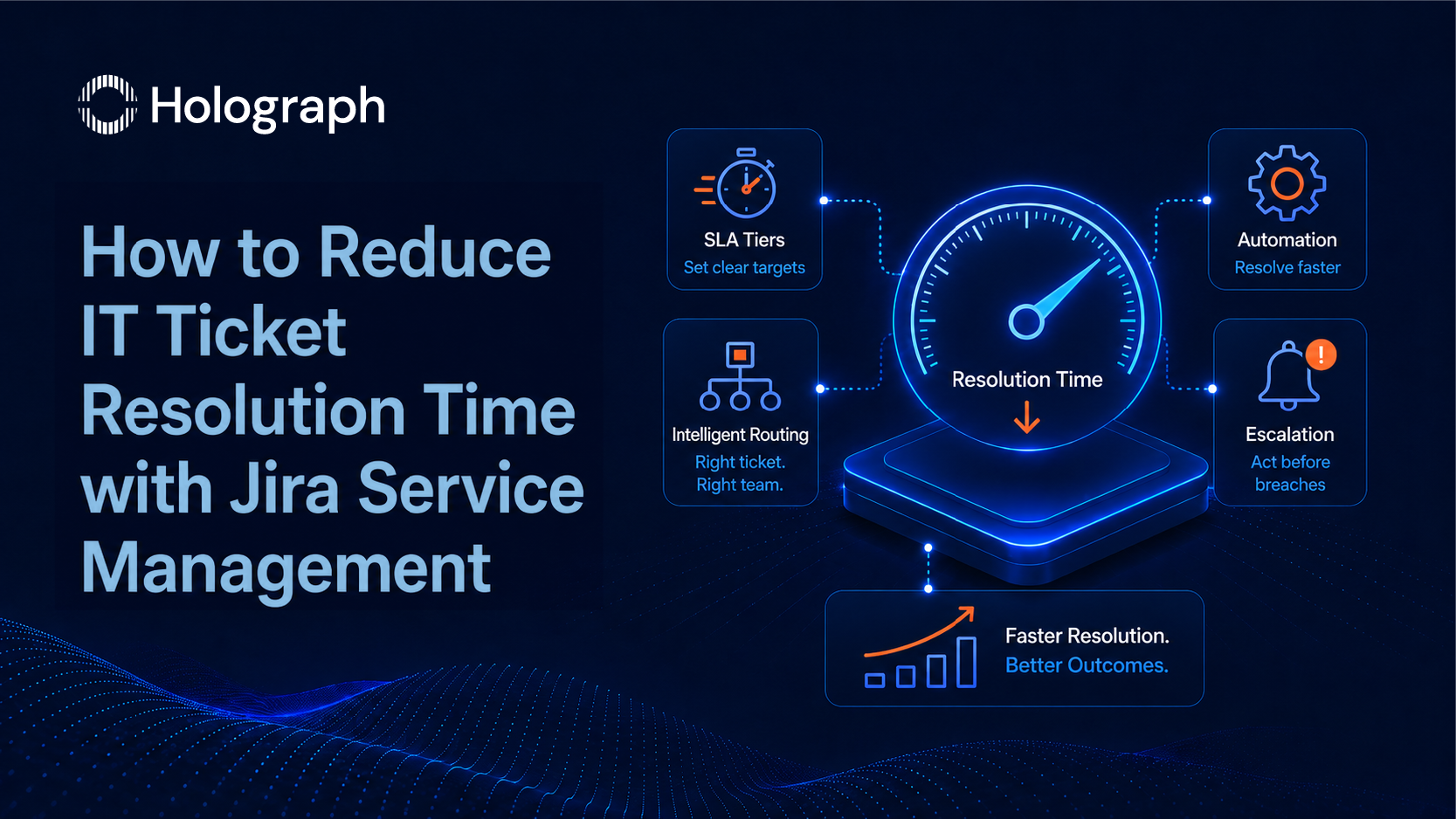
Ticket resolution time is the metric IT Directors report upward, and it rarely improves without a deliberate change to how tickets are routed, prioritised, and escalated. The instinct is to attribute slow resolution to headcount. More staff is one solution. It is also an expensive one that does not address the routing and visibility problems that slow most tickets down in the first place.
Most Jira Service Management deployments contain the configuration to resolve tickets significantly faster than they do. The capability is there. The decisions that activate it (SLA tier design, intelligent routing, specific automation rules, and escalation logic) are usually never made because the implementation stopped at go-live rather than continuing into optimisation. This post covers those four decisions in sequence. For the broader ITSM framework that governs them, see the Enterprise ITSM guide.
Why Tickets Take Longer Than They Should
Before addressing the configuration, it is worth naming the three operational failures that slow resolution time. All three are structural problems, not effort problems.
The Routing Problem
Tickets arrive in a general queue. Agents pick from the pool based on what they know how to resolve quickly. Complex tickets stay in the queue longest because they are the least appealing to pick up. Simple tickets are resolved fast. Complex tickets stall. The overall resolution time average reflects that pattern: pulled down by the simple work, held up by the complex work that actually matters most to the business.
Auto-assignment removes the general queue as a routing layer entirely. Every ticket goes directly to the team or individual who owns it, based on request type and category. Agents stop picking and start resolving.
The Prioritisation Problem
Users rate every issue as high priority because they do not understand the triage criteria. The IT team has no objective basis to override that rating. Everything marked urgent sits in the same tier. SLA timers start running from ticket creation regardless of whether the right person has seen the ticket.
The result is predictable: SLA breaches spread across every priority tier because the priority assignments do not reflect actual business impact. Genuinely critical incidents sit alongside routine requests under the same urgency label. The SLA data becomes a measure of queue volume, not of IT responsiveness to real business events.
The Visibility Problem
Team leads cannot see in real time where the queue is backing up. SLA breach alerts go to a shared inbox that nobody monitors consistently, or to the agent who is already behind. Reporting on resolution time shows an overall average that obscures whether the problem is routing, complexity, staffing, or all three.
Visibility is not a reporting problem. It is a configuration problem. The right alerts at the right thresholds, sent to the right people, remove the need for manual queue monitoring.
SLA Configuration: the Foundation of Resolution Time Management
SLA timers in JSM begin at ticket creation. Every configuration decision made after that point is working within a framework set by the SLA design. Getting that design right is the prerequisite for everything else in this post.
Setting SLA Tiers Based on Business Impact
ITIL 4 builds priority from two variables: impact (how many users or business processes are affected?) and urgency (how quickly does this need resolution before the business impact grows?). Both are defined in business terms, not IT terms. A critical incident stops a revenue-generating process or a compliance-critical workflow. A standard request affects one user with a non-time-sensitive issue.
A four-tier priority matrix covers the range for most enterprise IT departments:
- Critical: 1-hour resolution target, 24/7 clock
- High: 4-hour resolution target, business hours
- Medium: 8-hour resolution target, business hours
- Standard: 24-hour resolution target, business hours
The targets need to reflect what the IT team can operationally deliver. If 40% of tickets at a given tier breach their SLA in the first quarter, the target is miscalibrated, not the team. Set starting targets from historical data where it exists. Where it does not, collect four weeks of baseline data before setting permanent targets. For the ITIL 4 priority model and its application to JSM configuration, see How to Implement ITIL 4 with Jira Service Management.
Calendar Hours vs 24/7 Clock: Getting the Timer Right
SLA timers in JSM can run on business hours or around the clock. Most request types should run on business hours. Critical incidents affecting production systems run on a 24/7 clock. Applying a 24/7 clock to all request types inflates breach rates artificially on out-of-hours tickets that fall within business-hours SLA targets when the calendar is applied correctly.
Configure working hours calendars in JSM project settings before setting any SLA timers. A support organisation covering the Gulf region needs a business hours calendar that reflects the Sunday-to-Thursday working week, not a Monday-to-Friday default. This is a one-time configuration that affects every SLA timer in the project.
First Response Time vs Resolution Time: Track Both Separately
First response time is the window from ticket creation to the first agent reply. This is the metric users experience directly: the wait before anyone acknowledges the issue. Resolution time is the window from ticket creation to ticket closure. This is the metric IT leadership reports on.
Configure JSM to track both independently. Conflating them masks a specific failure pattern: high first-response performance alongside poor resolution performance indicates agents are acknowledging tickets quickly but not resolving them. That pattern points to a complexity or escalation problem, not a responsiveness problem. Both problems are solvable with different interventions. Without separate tracking, they appear as a single metric.
Intelligent Routing: Getting Tickets to the Right Person Faster
Routing is where the largest single improvement in resolution time usually comes from. Every minute a ticket spends in a general queue before assignment is a minute the SLA timer is running against nobody.
Auto-Assignment by Request Type and Team
Component assignments in JSM route each request type to the team or individual who owns it. When a ticket is created, the automation matches the request type to the assigned component and routes directly. No general queue. No agent selection. The ticket arrives with the person who will resolve it.
Round-robin assignment within a team distributes volume evenly. Without it, the fastest agents or the most junior agents take disproportionate shares of the queue. The agents with the deepest expertise on complex request types receive fewer tickets than the team's capacity would support, because simpler requests arrive faster and get picked first. Round-robin removes that distortion.
Skills-Based Routing for Complex Tickets
Organisations with specialised IT sub-teams (network, security, cloud, applications) benefit from keyword-based routing rules that send tickets to the correct sub-queue before any human sees them. A JSM automation rule structured as IF request type contains "cloud access" or "VPN" THEN assign to the Cloud Operations queue handles that routing without manual triage.
Test routing rules against a sample of the previous 30 days of tickets before going live. Routing rules that work correctly for 90% of historical ticket types will generate the occasional misroute for edge cases. Those edge cases are managed through a single reassignment rule rather than through manual triage of the entire queue.
Escalation Paths: Automating What Currently Requires a Manager Decision
Manual escalation requires an agent to flag their own delay. Under volume pressure, that rarely happens. Automated escalation removes the requirement for agents to self-report.
The escalation structure that works for most enterprise IT environments:
At 75% of the SLA window: notify the assigned agent and their team lead by JSM notification. The agent is reminded that the ticket needs attention. The team lead knows without having to check.
At 90% of the SLA window: reassign the ticket to the team lead directly and notify their manager. The ticket is no longer waiting for the agent to act. The team lead owns it.
This structure prevents the pattern of breach alerts going to a shared inbox that no single person is responsible for monitoring. The alert goes to a named individual. The escalation triggers a reassignment, not just a notification.
Automation Rules That Reduce Resolution Time
Each of the four rules below is a specific JSM automation configuration. The rules are presented in order of operational impact.
SLA Breach Alerts with Correct Recipient Logic
Trigger: SLA timer reaches 75% of the configured window. Action: Send JSM notification to the assigned agent and their team lead.
Trigger: SLA timer reaches 90% of the configured window. Action: Reassign ticket to the team lead. Send notification to the team lead and their manager.
The most common misconfiguration is sending alerts to a shared inbox. A shared inbox is not a named recipient. Configure alerts to the specific user accounts of the assigned agent and team lead. Test the alert configuration on a low-priority ticket before relying on it for critical incidents.
Auto-Assignment for Repeat Issue Types
Trigger: Ticket summary or description contains a keyword pattern matching a known issue category. Action: Assign directly to the owner of that issue type; set priority based on the issue category's standard tier.
Build the keyword list from the previous 60 days of ticket data. Identify the 10 request types that appear most frequently in free-text ticket summaries. Map each to the team that resolves them. This removes queue-level triage for predictable issue categories: the tickets agents could assign in 30 seconds but spend five minutes deciding on under queue pressure.
Auto-Resolution for Known, Documented Issues
Trigger: Ticket matches a known issue type with a documented resolution in the Confluence knowledge base. Action: Post the relevant Confluence article link in the ticket comment. Set ticket status to "In Progress."
This does not replace agent resolution. It reduces the time before the user has a documented fix to attempt. On known issue types with clear documented resolutions, a portion of tickets close before the agent intervenes. The user follows the article and the issue resolves without a queue touch. For AI-assisted knowledge matching and auto-resolution capabilities in JSM, see also Rovo Agents for ITSM.
Auto-Close for Stale Waiting-for-Customer Tickets
Trigger: Ticket status is "Waiting for customer" and no customer response has been received within 5 business days. Action: Automatically close the ticket with a closure notification to the customer.
Open tickets in "Waiting for customer" status accumulate queue noise and inflate open ticket counts. Agents spend time checking whether customers have responded. Auto-close removes that overhead. The customer notification includes a link to reopen or raise a new ticket if the issue persists.
The Four Metrics That Tell You Whether Resolution Time Is Improving
Track these four metrics from week one of any JSM optimisation work. Not the full Atlassian reporting suite. These four tell the story.
Average Resolution Time by Priority Tier
Track per tier separately: Critical, High, Medium, Standard. An improving overall average that masks static Critical and High tier performance means the routing and escalation logic is helping the low-priority queue but not the tickets that matter most to the business. The overall average is useful for leadership reporting. The per-tier breakdown is useful for diagnosing what to fix next.
Baseline resolution time in the first week after configuration changes go live. Compare week on week for 90 days. Directional improvement in the first 30 days is the signal that routing and escalation changes are working. Flat or worsening metrics after 30 days indicate a structural problem that configuration changes alone will not solve.
SLA Breach Rate by Request Category
Which request types generate the most SLA breaches? Breaches are not distributed evenly across categories. Two or three categories typically account for the majority of breaches. Those categories are where routing, prioritisation, or complexity is failing.
Fix the highest-breach category first. It has the most resolution time to recover and the most concentrated impact on the overall SLA breach rate. When the first category improves, move to the second. Fixing categories sequentially is more effective than making broad changes across the entire configuration simultaneously.
First Contact Resolution Rate
The percentage of tickets resolved on the first agent response, without a follow-up exchange. Industry baseline for a well-configured ITSM environment: 70 to 75%. A rate below 50% indicates a consistent intake problem: agents are picking up tickets without enough information to resolve them on the first response. The fix is the intake form, not the agents. Add mandatory fields that capture the context needed to resolve the most common ticket types without follow-up.
Repeat Ticket Rate
Tickets reopened or re-submitted for the same issue within 14 days. A high repeat rate indicates problem management is not addressing root causes. The incident closes. The underlying issue persists. The user raises the same ticket two weeks later. Each repeat ticket should link to a problem record in JSM that tracks the root cause investigation and the remediation progress. When the root cause is resolved, the repeat ticket rate for that issue type drops. If it does not drop, the root cause analysis was incomplete.
Resolution Time Is a Configuration Problem
Ticket resolution time improves when routing is deterministic, prioritisation is consistent, escalation is automated, and the metrics are visible from week one. None of these require more headcount. They require configuration decisions that most JSM deployments never make, because the implementation cycle stopped at go-live.
The self-service layer that deflects tickets before they enter the resolution queue is covered in How to Build a Self-Service IT Portal That Reduces Ticket Volume. The full ITSM framework that governs the decisions in this post (service catalogue design, ITIL 4 practice alignment, adoption programme structure) is in the Enterprise ITSM guide. Together, the three posts in this series cover the full operational stack: framework, portal, and resolution.
Holograph's ITSM team configures and optimises Jira Service Management deployments: SLA design, automation rules, routing logic, and 90-day adoption programmes. See Holograph ITSM services.
Frequently Asked Questions
How do you reduce IT ticket resolution time with Jira Service Management?
Reducing resolution time in JSM requires four configuration changes in sequence. First, design SLA tiers using a priority matrix built from business impact and urgency. Second, configure auto-assignment routing so tickets reach the correct team or individual at creation, with no general queue as an intermediate step. Third, implement automation rules for SLA breach alerts, auto-assignment of repeat issue types, and auto-resolution for documented issues. Fourth, set escalation paths that trigger automatically at 75% and 90% of each SLA window.
How do you configure SLAs in Jira Service Management?
SLA configuration in JSM requires a priority matrix agreed with the business before any timers are set. The matrix defines four tiers based on impact and urgency: Critical (1-hour, 24/7 clock), High (4-hour, business hours), Medium (8-hour, business hours), and Standard (24-hour, business hours). Configure a working hours calendar in project settings before applying timers. Set resolution targets based on what the team can operationally deliver, not aspirational targets. If a tier breaches 40% of its SLAs in the first quarter, recalibrate the target, not the team.
What ITSM automation rules have the most impact on resolution time?
Four automation rules deliver the highest return. SLA breach alerts: at 75% of the SLA window, notify the assigned agent and team lead; at 90%, reassign to the team lead directly. Auto-assignment by request type: route each ticket to the correct team at creation, removing the general queue. Auto-resolution for known issues: post the relevant Confluence article when a ticket matches a documented issue type. Auto-close for stale tickets: close tickets in "Waiting for customer" status after 5 business days with no response.
What is first contact resolution rate and what is a good benchmark?
First contact resolution (FCR) rate is the percentage of tickets resolved in a single agent interaction, without follow-up from the user. The industry baseline for a well-configured ITSM environment is 70 to 75%. A rate below 50% indicates an intake problem: agents are picking up tickets without enough information to resolve them on the first response. The fix is the request form, not agent performance. Add the fields that capture the context needed to resolve the most common ticket types without a follow-up exchange.
How do you set up auto-assignment in Jira Service Management?
Auto-assignment in JSM uses component assignments to route each request type to the team or individual who owns it. Configure components in project settings, map each request type to the relevant component, and set the component lead or team queue as the default assignee. Use round-robin assignment within teams to distribute volume evenly across agents. For specialised routing, add automation rules that match request types to specific sub-queues using keyword patterns. Test routing rules against 30 days of historical tickets before activating.
What ITSM metrics should an IT Director track weekly?
Four metrics cover the essential picture. Average resolution time by priority tier: track per tier separately, not as an overall average. SLA breach rate by request category: identifies where routing or prioritisation is failing. First contact resolution rate: the percentage of tickets resolved without a follow-up exchange (industry baseline: 70 to 75%). Repeat ticket rate: tickets re-submitted for the same issue within 14 days (a high rate indicates problem management is not addressing root causes). Track all four weekly for the first 90 days, then monthly.