Jira Plans vs Jira Align: Which Planning Layer You Need
Atlassian ships two planning layers above team-level Jira, and the one most organizations already own answers to two names. Jira's Cloud documentation calls it Plans. The Data Center documentation still calls it Advanced Roadmaps. Much of the published guidance on this decision uses the older name throughout, which makes a straightforward comparison harder than it should be.
Most teams reach this decision at one of two moments: during annual planning, or when a Jira Premium renewal puts the cost in front of someone in finance. What settles it is not a feature list. Both products will show you work across teams. What separates them is how many teams you have, how many Jira instances they live in, which way of working you have committed to, and whether your organization plans above the team level well enough today for either tool to reflect something real. The problem both products exist to solve is covered in our guide to scaling agile with Jira Align.
Advanced Roadmaps is now called Plans
Atlassian's Jira Cloud documentation and product guides now call the feature Plans. The Data Center documentation still calls it Advanced Roadmaps. The capability is the same one, and Atlassian's own guide to it currently sits at a URL reading advanced-roadmaps while the page itself is titled for Plans. If you are researching this, search both names.
What Jira Plans does
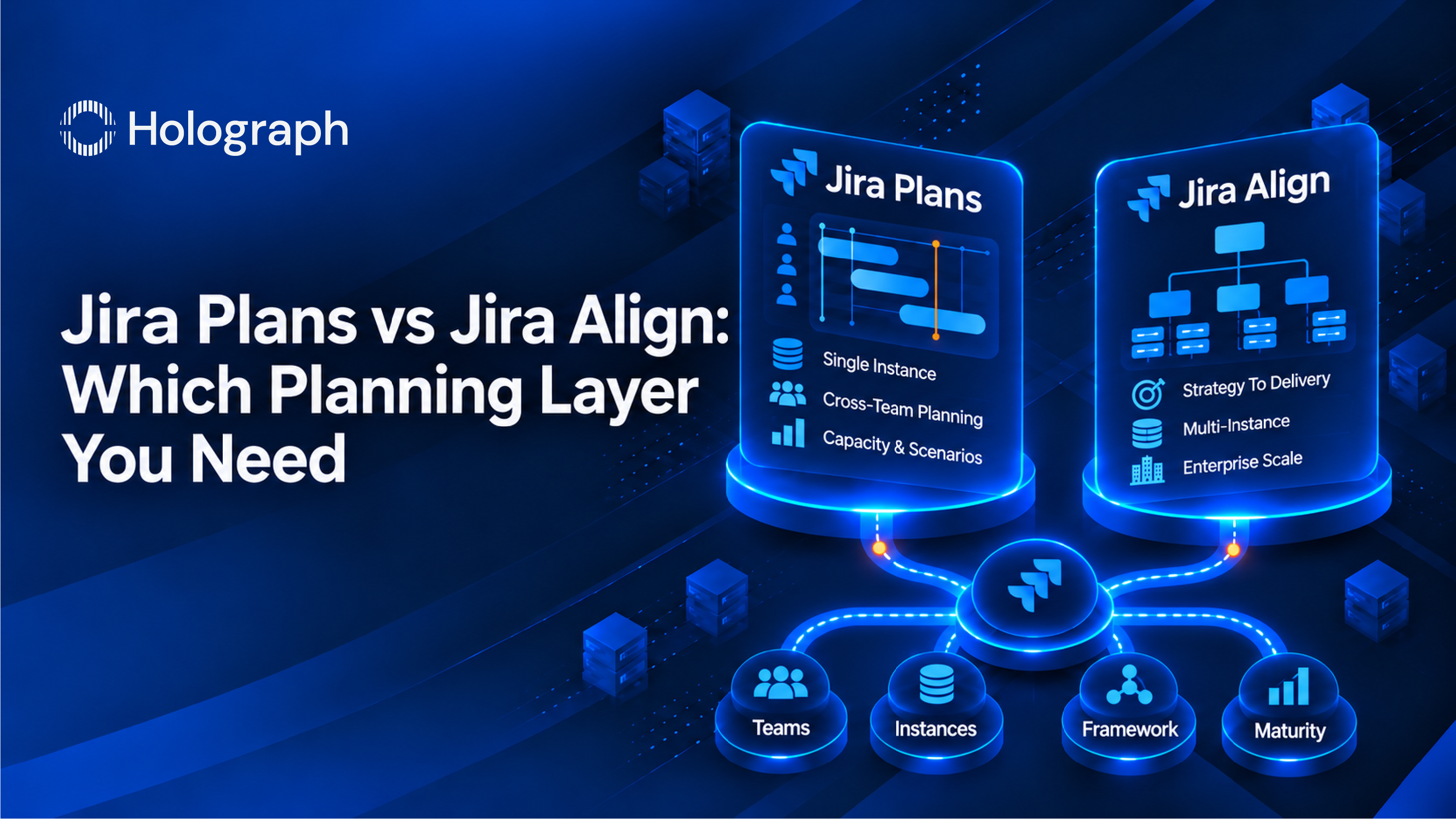
Plans is cross-team planning inside Jira. It pulls work from three kinds of source, boards, spaces, and filters, and combines them into a single timeline, so a program manager can see several teams in one view without changing how any of those teams work day to day.
It also adds a hierarchy level that plain Jira does not have. Jira's standard levels run epic, story, task, and subtask. Plans lets you add custom levels above the epic, and the default one is Initiative, a container for epics that span multiple teams or spaces.
The views carry the rest. Program Board lays out every team in the plan as a row and every iteration as a column, with each column covering one to four weeks, so dependencies between teams appear on the board rather than in somebody's head. Capacity sits directly on the timeline, which means over-allocation shows up before you commit to a date. Scenarios let you model a change without committing to it.
Plans works as a sandbox. Changes you make stay in the plan until you save them back to Jira through Review changes, so your teams' live data is untouched while you are still deciding.
What it takes to get Plans
Plans is available on Jira Premium and Jira Enterprise only. Standard and Free include the basic single-project timeline, without the cross-team planning. On Standard, the first question is whether a Premium upgrade pays for itself, and that one sits ahead of any comparison with Jira Align.
The scale limits matter as much as the edition. Plans covers one Jira instance. Atlassian recommends no more than 50 teams in a single plan for performance, and suggests splitting larger programs across several plans.
What Jira Align does
Jira Align is a separate product that sits above the team tools and connects strategy to delivery across portfolios and programs. Atlassian positions it for hundreds to thousands of users at multiple levels of an organization, and it connects to multiple Jira instances.
It also supports more ways of working. Plans supports Scrum, Kanban, and custom methods. Jira Align adds the Scaled Agile Framework, Lean Startup, Spotify, LeSS, Value Engineering, Scrum@Scale, and hybrid or custom models. For an organization that has already committed to SAFe, that single difference settles the decision.
The four questions that decide it
The obvious way to choose is to compare feature lists. That turns out to be a poor starting point, because both products will show you work across teams and the lists overlap. Four things separate them faster.
Start with the team count. Atlassian positions Plans for collections of up to 20 agile teams working together, about 50 to 150 people. Above that number the fit gets strained.
Then count the Jira instances. Plans covers one. Jira Align connects to several, which decides it outright for any organization that grew by acquisition and never merged its Jira estates (more common than the org charts suggest).
The way of working comes next. If you run SAFe, Jira Align supports it directly and Plans does not. The event that makes that difference concrete is PI planning, which Jira Align is built to run.
The fourth is planning maturity above the team level. A planning tool models a process. But if that process is still being invented, the tool will model the gap faithfully and expensively, which is why we assess maturity before recommending either product.
When an organization runs both
Running both is supported. Atlassian states that some businesses find a need for both, because the two serve different use cases. Atlassian also states that Advanced Roadmaps and Jira Align are not integrated today. That second point is worth knowing before anyone budgets for a connected stack.
Getting the decision right the first time
We start with the operating model rather than the tool. That means mapping how work flows from funded initiatives down to delivery today, assessing agile maturity above the team level, and looking at the state of the Jira estate the planning layer will sit on. The product recommendation comes out of that work, and sometimes the answer is that neither product is the right next step yet. Either rollout also needs people who have configured one before, which we deliver as IT staff augmentation sized to the engagement rather than a permanent hire.
Holograph is an Atlassian Solution Partner with specializations in ITSM, Cloud, and DevOps, and we work across enterprise Atlassian estates, covering licensing, migration, and implementation. Choosing the planning layer is Performance work in the three-pillar model: getting more from the Atlassian platform you already run. The full picture of what that layer does once it is in place sits in the pillar guide.
If you are weighing Jira Plans against Jira Align, talk to us about Jira Align and we will start with a readiness assessment rather than a product pitch.
Frequently asked questions
Is Advanced Roadmaps the same as Jira Plans?
Yes. Atlassian's Jira Cloud documentation now calls the feature Plans, while the Data Center documentation still calls it Advanced Roadmaps. The capability is the same, and the name you see depends on which deployment you are reading about. Searching both names will find you more of the available guidance, since much of what is published still uses the older one.
Which Jira editions include Jira Plans?
Jira Plans is available on Jira Premium and Jira Enterprise. Standard and Free include the basic timeline view for a single project, without the cross-team planning capabilities. That makes the Premium edition a prerequisite rather than an upgrade decision you can defer, so on Standard the cost of Premium belongs in the comparison from the start.
How many teams can Jira Plans handle?
Atlassian positions Plans for collections of up to 20 agile teams working together, about 50 to 150 people at a time. Within a single plan, Atlassian recommends no more than 50 teams for performance reasons and suggests splitting larger programs across several plans. Jira Align is positioned for hundreds to thousands of users.
Does Jira Plans support SAFe?
Plans supports Scrum, Kanban, and custom methods. Jira Align is the product that supports the Scaled Agile Framework, along with Lean Startup, Spotify, LeSS, Value Engineering, Scrum@Scale, and hybrid or custom models. An organization committed to SAFe will find that this difference settles the choice on its own.
Can you use Jira Plans and Jira Align together?
Yes. Atlassian states that some businesses find a need for both products because the two serve different use cases. Atlassian also states that Advanced Roadmaps and Jira Align are not integrated today, so running both means running two planning layers rather than one connected stack. Budget and expectations should reflect that.
Does editing a plan change my Jira data?
No. Plans works as a sandbox. Any change you make stays inside the plan until you save it back to Jira through the Review changes function, so your teams' live work items are untouched while you model options. That is what makes scenario planning safe to do during an active quarter.
Decide the planning layer before you buy it